

The auto-steer retrofit market has been heating up in recent years, especially with some new Chinese makers bringing even more choice. Wanting to stay competitive, Topcon has developed the Vale Line steering kit.
KEEPING IT BRIEF
- Value Line is an inhouse development from Topcon for the retrofit market.
- The steering system calibrates itself every time it is restarted and during operation.
- Including the GSM modem for remote support and NTRIP RTK, the system costs around £7,600.
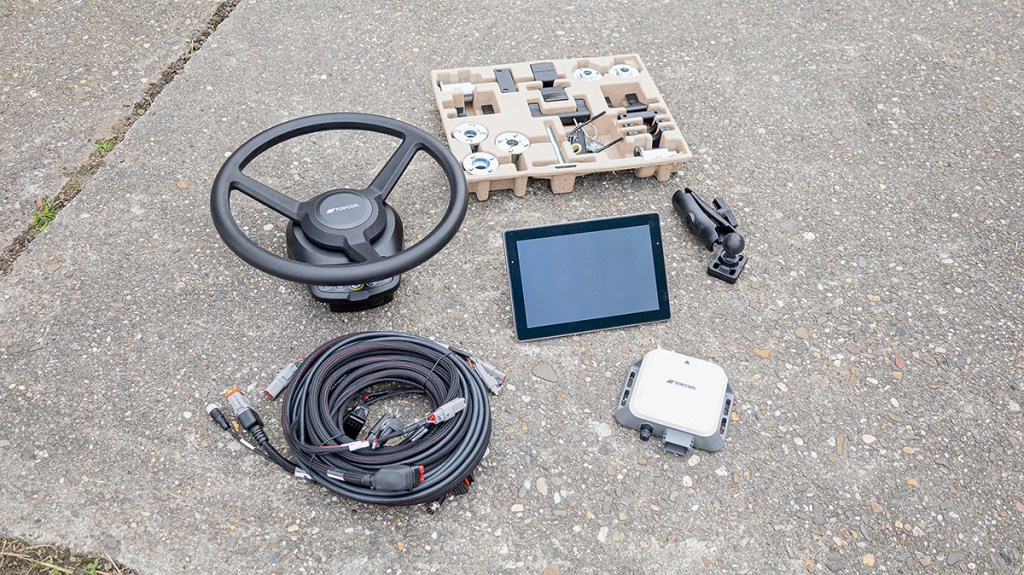
Topcon is now offering the more pocket-friendly Value Line retrofit steering package. A key part of this is the new XW-1 steering wheel with integrated electric motor which is operated in a very different way to Topcon’s previous retrofit system, the AES-35 (refer to profi 9/2021).
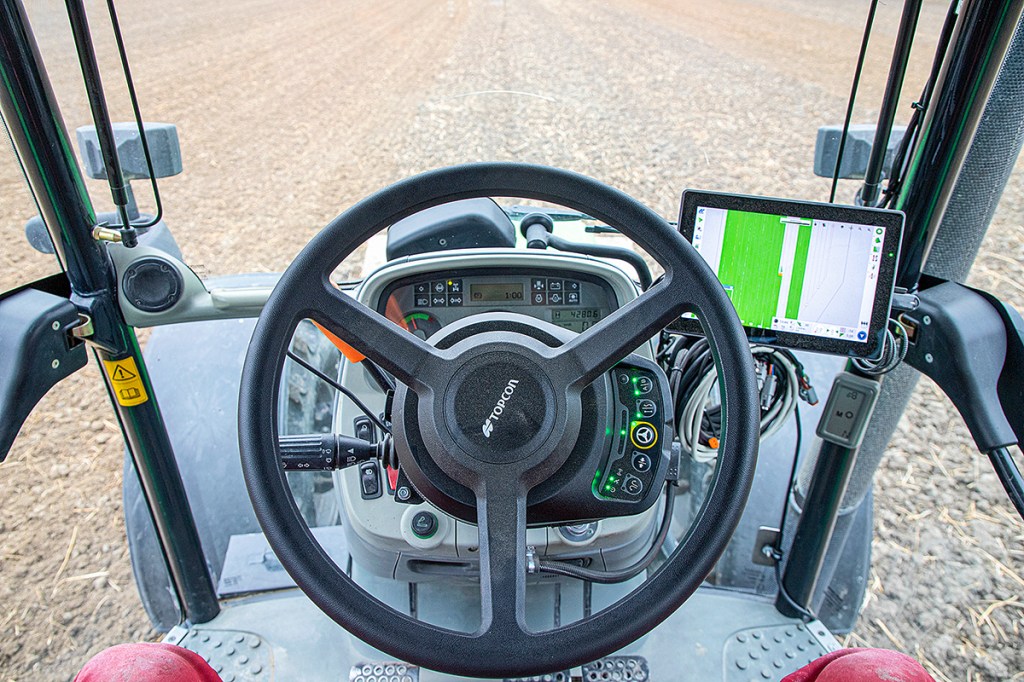
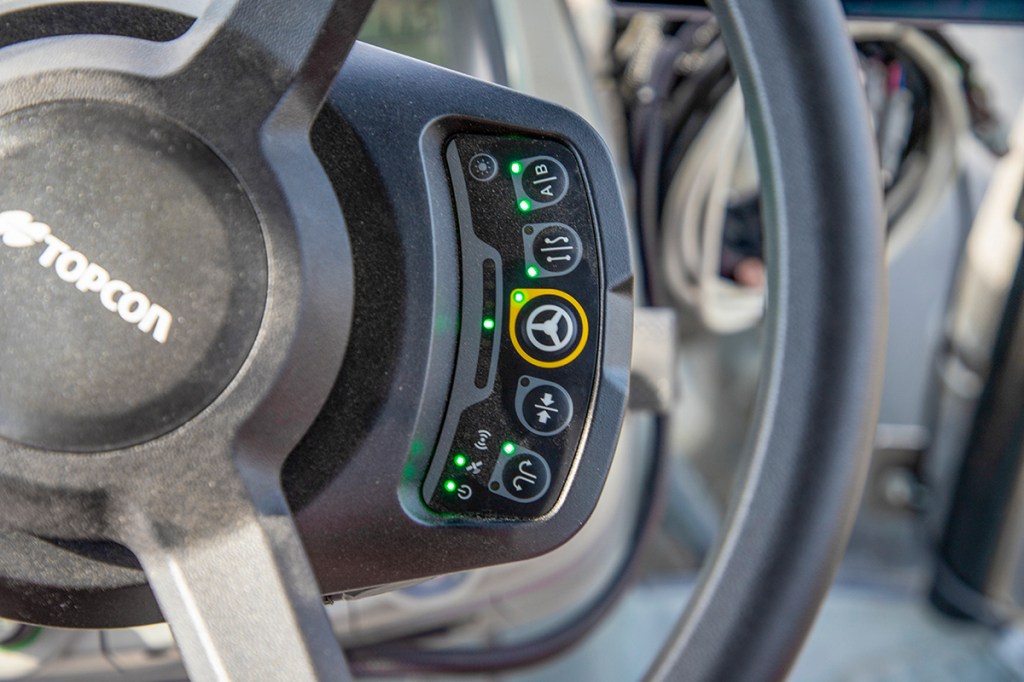
On the new system, all the basic auto-steer functions are controlled directly on the XW-1 steering wheel with its five buttons. The operator can use these to engage/disengage the steering, initiate an automatic headland turn, centre the waylines and create new waylines by setting A and B points. You don’t have to prod the touchscreen for these basics. This means you can lay out waylines without having to start a job.
Otherwise, there is no real difference, such as the torque, between the previous AES-35 motor and the new XW-1.
Drawing field boundaries
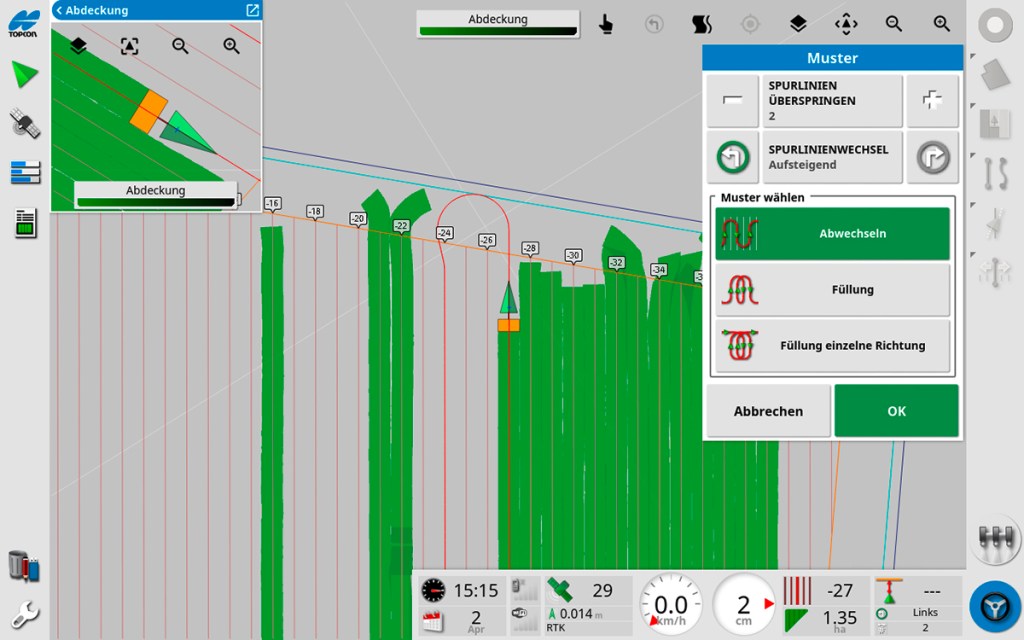
Also new from Topcon is the 10-inch XC1 display, where the operator can create or import field boundaries and manage jobs. Although it is not essential, creating field boundaries does make the steering system more user-friendly. For a start, the system then automatically recognises the field when you enter it. Secondly, in that case the operator can always see all the waylines within the field.
Without the field boundaries, only the current track and two adjacent tracks are shown. This can make it harder to line up on the right track if you want to skip bouts and work the field in loops, for example. This is why it makes more sense to create the field before you start work and either import the boundary data or record them by travelling the perimeter of the field.
The operator can select the outside of the implement as the recording point. Hitting the play button starts off the recording; pressing ‘Stop’ ends it. The recording can be interrupted at any time by tapping the pause button. This is particularly useful for straight boundaries: all you need then is to record a start point and an end point with a pause in between. The system then generates the straight line between these recorded points.
Connecting up the corners
We also really liked how you can create the auto-steer waylines while you’re recording the field boundary — or at least you can once you have a bit of experience with the Topcon system under your belt.
You can define the reference line by setting the two points on a straight A-B line, by travelling a contoured line or by ‘projecting’ the recorded field boundary inwards. We liked the last option when working the headlands. The only niggle here is that Value Line links the lines that meet in the corners to tight curves. In practice, auto-steering along these curves isn’t really possible with a mounted implement.
Our opinion is that it would be better if the projected bouts ran straight into the corners. Then the operator could work right into the corners, raise the implement and reverse, and then drive into the next field bout and continue in auto-steer.
Headland turns on auto
The Value Line doesn’t simply steer along parallel lines in the field and on the headland; it can also turn on the headland and then automatically pull into the next bout. But, importantly, you do need the headland to be wide enough.
For our test we were using a 3.0m disc harrow and set up a 12m headland. This proved to be sufficient room for the system to do an automatic turn without going outside the field boundary or having to manually intervene. But we did skip one or two bouts at a time.
There are other turning strategies available. For example, the steer system can skip any number of field bouts, change the turning direction after each turn or work in loops. You set up the headland manoeuvre in the wayline menu. One point: the button you need only appears if the active wayline is either a straight line or a matching curve. The operator can also change the turning direction at any time.
Fitting it to an Agrotron K110
For our on-farm test we fitted the Topcon Value Line to a 2008 Deutz-Fahr Agrotron K110 with the local dealer helping with the installation, which took about half a day. If you want to route all of the electric lines properly, you’ll need to allow some more fitting time.
The original steering wheel was removed and replaced by a Topcon XW-1 motorised wheel. It’s important that the anti-rotation bracket sits very snugly against the trim so that there’s no play when the auto-steer is working. Since the standard kit didn’t include a suitable anti-rotation bracket, the dealer’s workshop made one to suit the Agrotron K110.
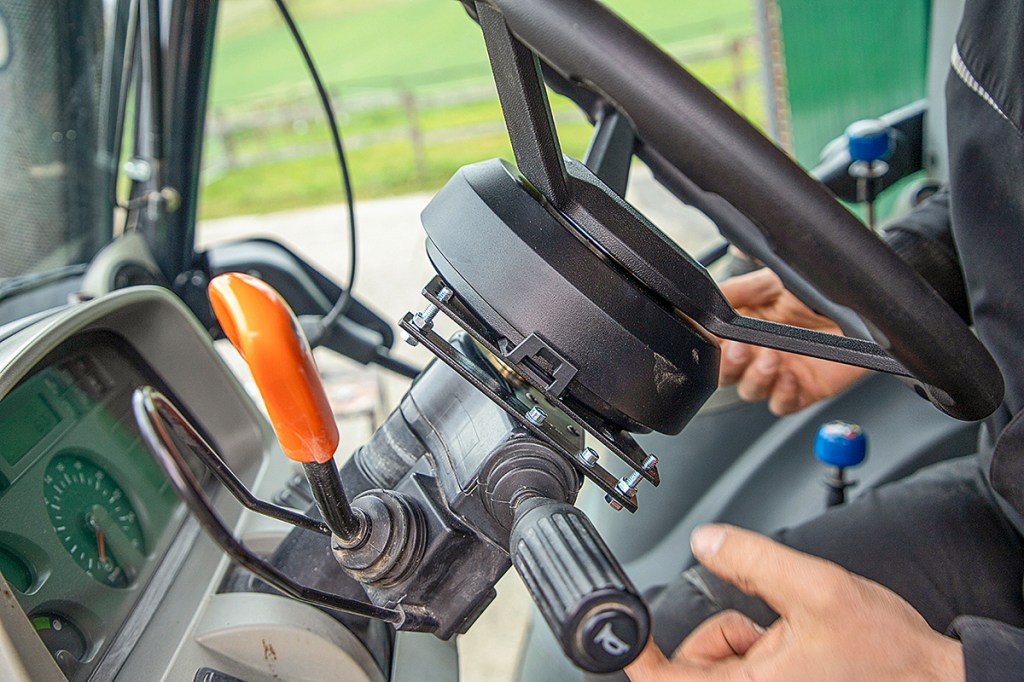
Compared with the original steering wheel, the retrofit wheel sits a bit higher due to the motor located underneath, which means the powershuttle lever is harder to reach for operators with smaller hands.
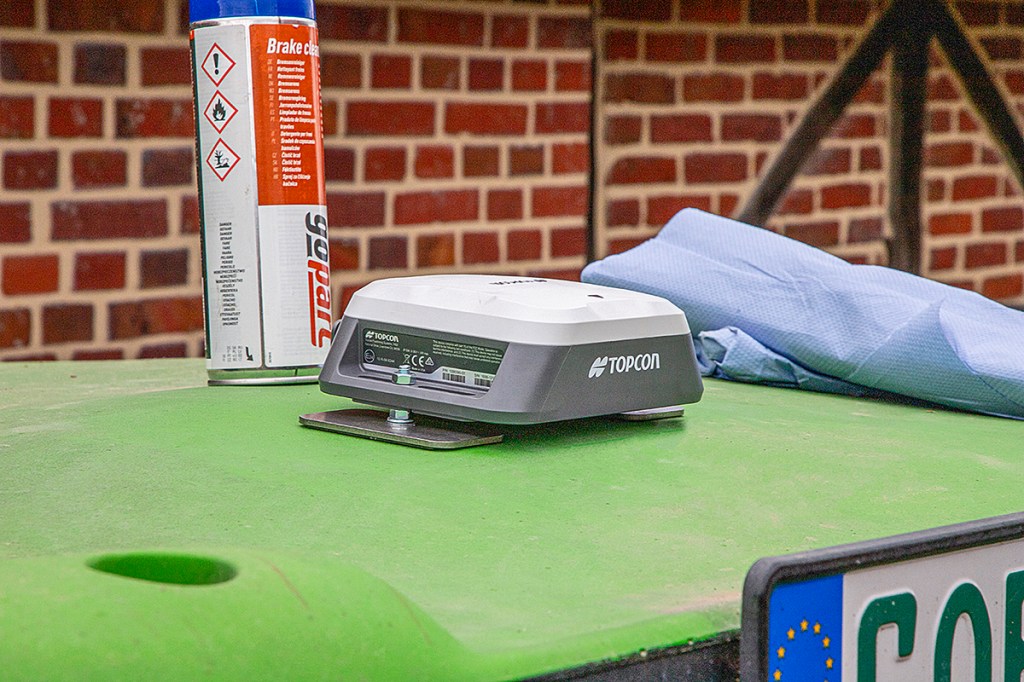
The Value Line doesn’t need a steering angle sensor, unless you want to work at very low speeds under 1km/hr. Instead, Topcon has built a virtual steering angle sensor into the XR-1 receiver. Behind that is an algorithm that works with the vehicle geometry and current steering wheel movement.
Intelligent self-calibration
When using the system for the first time, you have to measure the antenna position and vehicle dimensions to within ±5cm and enter these into the settings section. You can also enter implement dimensions.
A new feature is that the steering system calibrates itself every time you restart. In the past, you had to drive the tractor a set distance as well as in a circle for this initial calibration. Thanks to AI-based calibration, that step has gone. Initial base calibration is stored for the next system restart and the AI algorithm in the background sharpens up a bit more with every restart.
On top of that, the system periodically runs a re-calibration while you’re working — it checks itself. According to Topcon, this makes sense because the tractor’s steering behaviour may vary depending on axle loads, what machine is attached, implement side-pull, tyre pressures and soil conditions … and so on.
In practice, automatic calibration means the operator should switch the steering system on (but not engage it) before driving out to the field. Calibration then takes place on the way out to the field once the operator has confirmed that he or she is driving forwards. The automatic calibration process then runs quietly in the background.
After a restart, calibration took about 15 to 20 minutes in our test. If the fields are close to the farm, calibration may still be running when you start work. Although you can engage auto-steer en route and at any point — even if the calibration isn’t finished — the system won’t be quite as accurate as it could be. In our case this resulted in unnecessary wiggles when the system was pulling into the bout. Topcon says the latest software update significantly speeds up the automatic calibration process.
Steering into the bout and maintaining the course is also influenced by the sensitivity settings. The operator can tweak the default values if needed. Typically, the preset is 50% on a 0 to 100 scale. Depending on whether you’re crawling or racing along, it’s worth nudging the virtual sliders to alter steering sensitivity.
Lining up on the next bout
In general, especially with narrower working widths, the operator should line up for the next bout as accurately as possible. When we first used the 3.0m disc harrow, the system occasionally locked onto a different bout than the one we were aiming for. We then had to grab the wheel quickly and correct the direction. With a bit of practice, we got a feel for the right moment to engage auto-steer. After that the system pulled the tractor cleanly into the bout without any wiggles.
When you disengage the steering wheel motor you really have to take a firm hold, because the powerful motor offers a fair bit of resistance. Alternatively, you can press the engage/disengage button on the steering motor. We soon got used to the clear, easy-to-find button on the wheel and ended up preferring it to the engage button on the display. When the operator presses the button on the wheel, it takes about two seconds before the steering motor cuts in, which is for safety reasons.
Good bout-to-bout accuracy
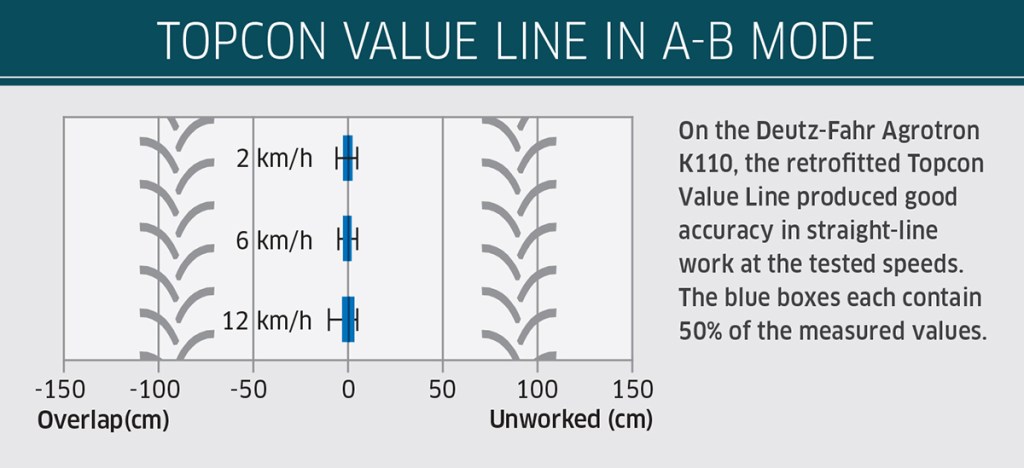
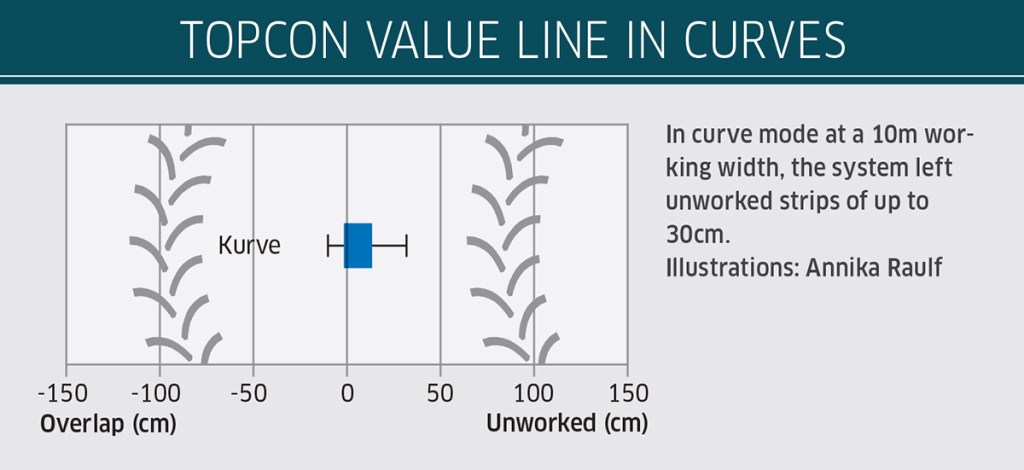
We measured the Value Line’s bout-to-bout accuracy using the exact same procedure as in previous steering tests. This involved driving down a test plot with straight A-B lines at 2, 6 and 12km/hr, then a set curve at 6km/hr. The spread of the results can be seen in the charts “Topcon Value Line in A-B mode” and “Topcon Value Line in curves”.
During these runs, the GNSS receiver was picking up between 25 and 31 satellites, with positions corrected using RTK data from the internet. In straight-line work, the Value Line showed good accuracy. At both 2km/hr and 6km/hr, 50% of the recorded steer values fell within a band between 2cm overlap and 2cm unworked. We had set a working width of 10m. At 12km/hr, auto-steer was only slightly less precise.
Doing the curved line test, the bout-to-bout deviations were greater than in straight lines – just like with other retrofit systems we’ve tested. This said, with up to 10cm overlap and 32cm unworked strips, these deviations were still within a very acceptable range. Half of the measurements showed just 1cm overlap and up to 13cm unworked.
Other points worth mentioning
- Topcon is keen to point out the electric steering wheel is not sourced from China. Developed in-house it is produced in Italy. Like the display, it’s dust- and waterproof to IP67, so both units are also suitable for tractors without a cab.
- The XC1 touchscreen is ISObus-compatible and can be used as a Universal Terminal for ISObus implements. It can also handle jobs via a Task Controller. On request by a customer, LH Agro can supply a cable with an ISObus socket.
- The XC1 is well put together. The display image is sharp and pretty easy to read, the touchscreen is responsive, and you can adjust the size of the on-screen buttons.
- The console runs on Topcon’s own Horizon software rather than on Android, which many other retrofit steering systems use.
- When a job is running, the worked bouts can be displayed and logged. The operator can pause an ongoing job at any time.
- Topcon manufactures the XR-1 receiver with integrated steering controller in its American factory.
- If the system has the optional GSM modem (around £360), remote support is possible. A service technician can then log into the console to answer operator questions or troubleshoot the system.
Summary
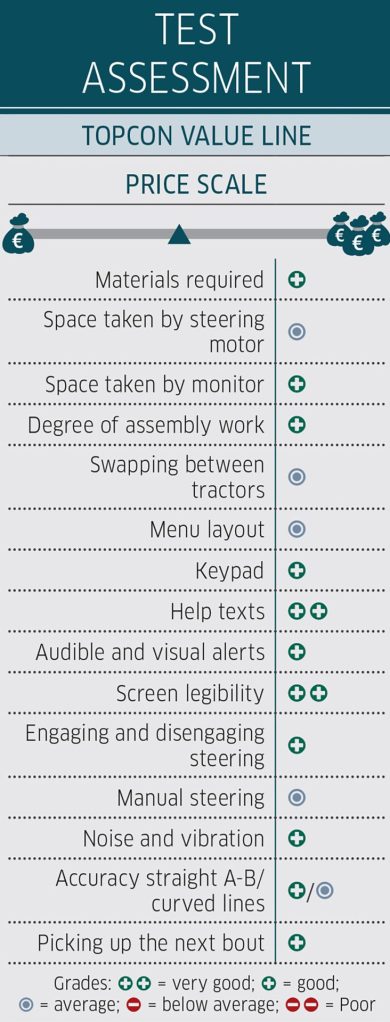
Topcon’s Value Line retrofit steering system is significantly cheaper than the established AES-35 package that it has been offering for several years now. Even so, at £7,240 in its standard form with a 10in display screen and without a GSM modem for mobile RTK reception, it is still dearer than comparable Chinese systems.
The Europe/American manufactured Value Line, scores not just on its good accuracy. It also impresses with its new steering wheel controls, automatic calibration with regular AI-based re-calibration and a robust, easy-to-read display that can also double as an ISObus Virtual Terminal for any compatible implements. The way the menus are laid out is easy to get to grips with, and the built-in help tips make life easy for the user.
Anja Böhrnsen, Alexander Bertling
For more up-to-date farming news click here and subscribe now to profi and save.